KitchenAid mixer parts are not all interchangeable. A replacement bowl, flat beater, dough hook, internal component, or power-hub attachment can have different compatibility requirements, so identifying the exact mixer before buying a part can prevent an expensive mismatch.
The easiest place to start is the KitchenAid model number. KitchenAid places the model number for stand mixers on the bottom of the base and provides model-specific product information, manuals, parts, and support resources through its official support system.
It is also important to separate replacement parts from stand mixer attachments. KitchenAid’s power-hub attachments are designed around the mixer’s front attachment hub, while bowls, beaters, dough hooks, and other mixer components can have more specific model or configuration requirements. KitchenAid’s current attachment documentation states that its power-hub attachments are designed to work with KitchenAid stand mixers, but individual attachment guides can still contain model-specific exceptions.
This guide explains how KitchenAid mixer parts are categorized, how to identify the correct part for your mixer, what actually determines compatibility, and what to check when a replacement part or attachment does not fit. It also connects you to detailed guides for bowls, beaters, dough hooks, pasta rollers, food grinders, slicers, ice cream makers, replacement parts, and older KitchenAid mixers.
Quick Answer: Which KitchenAid Parts Fit My Mixer?
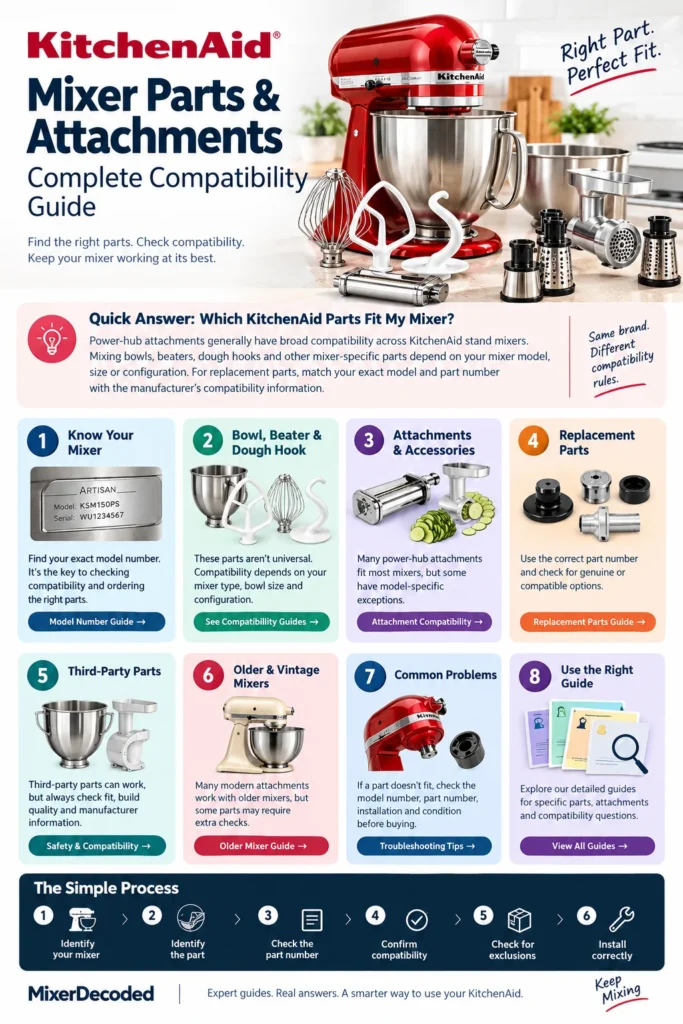
The right KitchenAid part depends on the type of component and your exact mixer model. Power-hub attachments such as pasta rollers, food grinders and slicer/shredders generally have broad compatibility across KitchenAid stand mixers. Mixing bowls, flat beaters, dough hooks and other mixer-specific parts have more specific compatibility requirements and may depend on the mixer type, bowl size or configuration. For a replacement part, identify your complete KitchenAid model number and the original part number when available, then compare them with the manufacturer’s compatibility information before purchasing.
In this article, we’ll cover:
KitchenAid Mixer Parts: What You Need to Know
KitchenAid mixer parts generally fall into three groups: mixer-specific replacement parts, bowl and mixing accessories, and power-hub attachments. Knowing which group a part belongs to is important because each group can have different compatibility requirements.
KitchenAid’s own product documentation identifies components such as the motor head, attachment hub, beater shaft, bowl, flat beater, dough hook, and wire whip as parts or accessories associated with a stand mixer. The exact bowl design and included accessories can vary by model.
Mixer-Specific Replacement Parts
These are parts used to maintain, repair, or restore the mixer itself rather than add a new food-preparation function.
Examples include:
- Attachment hub covers
- Attachment knobs
- Bowl latches and related hardware
- Base plates on applicable models
- Feet
- Other model-specific replacement components
KitchenAid provides replacement parts for stand mixers, but not every component inside a mixer is sold as a consumer replacement part. For example, KitchenAid’s replacement-parts guidance states that it does not sell internal parts or parts that connect to the motor through its standard small-appliance replacement-parts program.
This is why searching for a part by appearance alone can be unreliable. The exact mixer model and, where available, the manufacturer’s part information should be checked before ordering a replacement.
For a more detailed look at replacement components, see our guide to Stand Mixer Replacement Parts.
Bowl and Mixing Accessories
The second group includes the components used directly with the mixing bowl and beater shaft.
Common examples include:
- Mixing bowls
- Flat beaters
- Flex-edge beaters
- Wire whips
- Dough hooks
- Pastry beaters
- Scrapers and other model-specific mixing accessories
KitchenAid identifies the bowl, flat beater, wire whip, and dough hook as standard stand mixer accessories, while other accessories may be included with selected models or purchased separately. KitchenAid also notes that bowl design, size, and material can vary according to the stand mixer model.
These components should not automatically be treated as universal simply because they are made for KitchenAid mixers. For example, KitchenAid offers different dough-hook designs depending on the stand mixer and bowl configuration.
If you are replacing one of these components, start with the mixer model and then check the specific accessory. Our detailed guides cover KitchenAid mixer bowl compatibility, which dough hook fits a KitchenAid mixer, and which flat beater fits a KitchenAid mixer.
Power-Hub Attachments
Power-hub attachments are different from replacement parts and ordinary mixing accessories. They connect to the attachment hub at the front of the stand mixer and expand what the mixer can do beyond mixing and kneading.
Examples include:
- Pasta rollers and cutters
- Food grinders
- Slicer and shredder attachments
- Spiralizers
- Food processors
- Grain mills
- Ice cream makers
- Other KitchenAid hub attachments
KitchenAid states that its power-hub attachments are designed to work with KitchenAid stand mixers, and its current attachment pages describe the hub attachment system as compatible across its stand mixer range.
However, this does not mean that every KitchenAid component follows the same compatibility rule. A power-hub attachment connects to the front hub, while a bowl, beater, or dough hook connects to a different part of the mixer and can have different model or configuration requirements.
That distinction is important when researching compatibility. A KitchenAid mixer can accept a hub attachment without every bowl, beater, dough hook, or replacement component being interchangeable with that same mixer.
For a broader explanation of attachment compatibility, see our KitchenAid Attachment Compatibility Guide.
How to Find the Right KitchenAid Part for Your Mixer
The most reliable way to find the right KitchenAid mixer part is to identify the exact mixer model first and then match the part or accessory to that model. A product described simply as a “KitchenAid replacement part” may not fit every KitchenAid stand mixer.
The model number gives you a much more precise starting point than the mixer’s appearance, color, capacity, or the name of the series.
Start With the KitchenAid Model Number
KitchenAid places the model and serial number label for stand mixers on the bottom of the mixer’s base and on the back. If you need to turn the mixer over to read the label underneath, KitchenAid recommends placing it on a towel or other soft surface and taking care not to damage the speed control knob or locking mechanism.
Record the complete model number before searching for a replacement part or attachment.
For example, two mixers may both be described as 5-quart KitchenAid mixers but still use different bowls, beaters, dough hooks, or other accessories. KitchenAid’s own replacement-parts catalog demonstrates this model-specific approach by listing individual parts with the models they fit.
If you are not sure where to find the model number or how to interpret it, see our detailed KitchenAid Model Number Guide.
Identify Your Mixer Type
After recording the model number, identify the general mixer configuration.
The most useful distinction is whether the mixer is a tilt-head or bowl-lift design. Other characteristics, such as bowl capacity and the particular mixer series, can also affect which accessories are appropriate.
This matters because KitchenAid does not make every bowl, beater, dough hook, or accessory universal across its entire stand mixer range. For example, KitchenAid currently lists some accessory sets as compatible only with selected residential bowl-lift models and explicitly excludes particular model-number ranges.
Do not rely on the mixer’s capacity alone. A “5-quart” description is useful, but it is not a substitute for the complete model number when checking a replacement part.
Check the Exact Part or Attachment
Once you know the mixer model, identify exactly what you are trying to replace or add.
There is an important difference between searching for:
- A replacement part for the mixer
- A replacement mixing bowl
- A flat beater
- A dough hook
- A wire whip
- A power-hub attachment
- A component belonging to an existing attachment
The correct search should therefore combine the mixer model + part type + part number, whenever a part number is available.
For example, instead of searching only for “KitchenAid dough hook,” look for the dough hook specified for your particular mixer. Likewise, a replacement attachment component should be matched to the attachment model rather than selected simply because it looks similar.
Compare the Manufacturer’s Compatibility Information
Before purchasing, compare the part’s listed compatibility with the model number you recorded.
Look for information such as:
- Compatible model numbers
- Compatible mixer type
- Bowl capacity or configuration
- Attachment model number
- Part number
- Excluded models
- Whether the component is an optional accessory or replacement part
This step is especially important when a product listing uses broad wording such as “fits KitchenAid mixers.” KitchenAid itself provides model-selection tools for its attachments and lists specific exclusions for some accessories, showing why the exact product information matters.
Check the Part Number When One Is Available
A part number is usually more useful for compatibility research than a generic product name.
“KitchenAid flat beater” describes the type of component. A specific manufacturer part number identifies the particular component being sold.
The same principle applies to replacement bowls, attachment-hub components, dough hooks, and parts belonging to individual attachments.
If you already have the original part, check whether a part number is printed or molded onto it. If you are replacing a missing component, use the mixer model number and the manufacturer’s parts documentation to identify the appropriate replacement.
Confirm the Fit Before Installing the Part
The final check is physical fit.
A replacement part should connect or seat as intended without excessive force. If a bowl does not lock properly, a beater does not attach correctly, or an attachment does not enter the hub as expected, do not assume that forcing it into position will make it compatible.
KitchenAid’s current guidance also emphasizes that bowl design, size, and material can depend on the stand mixer model, while its documentation identifies the beater shaft, bowl, and attachment hub as separate components of the mixer.
If the part does not fit, go back to the model number and compatibility information before modifying, forcing, or using the component.
The basic rule is simple: identify the mixer first, identify the exact part second, and verify compatibility before buying or installing it.
KitchenAid Mixer Parts Compatibility: What Actually Determines Fit?
KitchenAid mixer compatibility depends on what type of part you are buying. There is no single compatibility rule that applies equally to every bowl, beater, dough hook, replacement component, and attachment.
For some accessories, the mixer model and bowl configuration are critical. For power-hub attachments, KitchenAid states that its hub attachments are designed to work across its stand mixer range, with some specific exceptions such as the Ice Cream Bowl attachment not fitting the Artisan Mini.
The first step is therefore to identify the type of part you are trying to replace or add.
| Part or accessory | Main compatibility factors |
|---|---|
| Mixing bowl | Mixer model, bowl size, bowl connection and mixer configuration |
| Flat beater | Mixer model and bowl configuration |
| Dough hook | Mixer model, bowl size and mixer configuration |
| Wire whip | Mixer model and bowl configuration |
| Flex-edge or pastry beater | Compatible mixer model or bowl configuration |
| Mixer replacement part | Exact mixer model and, where applicable, part number |
| Power-hub attachment | Power-hub connection and any attachment-specific exceptions |
| Attachment component | Exact attachment model or replacement-part specification |
Mixer Model
The mixer model is the most useful starting point when checking compatibility.
KitchenAid’s documentation shows that bowls and mixing accessories can vary between models. Its current guidance also explains that bowl style, connection, and beater design can differ between mixer configurations.
This is why two KitchenAid mixers that appear similar—or even have the same advertised bowl capacity—should not automatically be assumed to use the same replacement component.
Use the complete model number when searching for a replacement bowl, beater, dough hook, or model-specific part.
Mixer Configuration
The physical design of the mixer also matters.
The two main configurations are tilt-head and bowl-lift. KitchenAid explains that both configurations use common types of mixing accessories, including a bowl, beater, whip, and dough hook, but the accessories are not necessarily interchangeable between every mixer size or bowl configuration.
For example, KitchenAid specifically states that its beater accessories are designed for mini, tilt-head, or bowl-lift mixers, but are not interchangeable between stand mixer sizes or bowl sizes.
That makes the mixer configuration an important compatibility check rather than simply a descriptive feature.
Bowl Size and Bowl Connection
The bowl is another major compatibility factor.
A bowl must not only have an appropriate capacity; it must also connect to the mixer correctly. KitchenAid’s product documentation notes that bowl design, size, and material depend on the stand mixer model.
The way the bowl attaches also differs between mixer designs. A tilt-head mixer uses a different bowl arrangement from a bowl-lift mixer, so a bowl that physically resembles another KitchenAid bowl may still be unsuitable for a particular mixer.
This is also why bowl compatibility should be checked separately from power-hub attachment compatibility.
For a detailed explanation, see Are KitchenAid Mixer Bowls Interchangeable?.
Beater and Dough Hook Design
Beaters and dough hooks attach to the beater shaft rather than the front power hub.
KitchenAid currently identifies several types of beater accessories, including flat beaters, flex-edge beaters, wire whips, dough hooks, and pastry beaters. The manufacturer notes that dough hooks can have different designs depending on the stand mixer and bowl model.
Clearance is also important. The accessory needs to sit correctly relative to the bowl so that it can mix properly without contacting the bowl.
If you are replacing one of these components, use the specific mixer model and bowl configuration to identify the correct accessory rather than choosing solely by appearance.
See our detailed guides for Which Dough Hook Fits My Mixer? and Which Flat Beater Fits My Mixer?.
Power-Hub Connection
Power-hub attachments follow a different compatibility system.
KitchenAid describes its power-hub attachments as being designed to work with KitchenAid stand mixers, and its current attachment pages state that hub attachments work across its stand mixer range. KitchenAid’s Product Help documentation likewise states that attachments inserted into the power hub fit KitchenAid stand mixers regardless of age.
However, there are attachment-specific exceptions. KitchenAid identifies the Ice Cream Maker and Precise Heat Mixing Bowl as examples that do not fit the Artisan Mini because their bowl dimensions are too large for the Mini’s base.
This creates an important distinction:
A power-hub attachment can have broad compatibility without every KitchenAid accessory or replacement part being universally interchangeable.
Exact Part or Attachment Number
When replacing a specific component, the exact part or attachment number can provide a more reliable match than a general product name.
For example, “KitchenAid dough hook” identifies a category of accessory. A specific dough-hook part number identifies the particular component intended for particular mixer configurations.
The same principle applies when replacing a component of an existing attachment. If the manufacturer provides a replacement part number, use that information together with your mixer or attachment model rather than relying on photographs or dimensions alone.
Manufacturer Compatibility Information
Before purchasing, compare the manufacturer’s compatibility information with your mixer model.
Look for:
- Compatible model numbers
- Mixer configuration
- Bowl size
- Attachment model number
- Replacement part number
- Listed exclusions
- Installation requirements
This is particularly important when buying from a third-party marketplace. A listing that says “fits KitchenAid mixers” is not, by itself, enough information to establish compatibility for every type of component.
For KitchenAid’s own hub attachments, the manufacturer provides broad compatibility information. For bowls, beaters, dough hooks, and model-specific parts, the relevant product or manual may contain more specific requirements.
The Simple Compatibility Rule
When checking a KitchenAid mixer part, use this order:
1. Identify the mixer model.
2. Identify the type of part or attachment.
3. Check the mixer configuration and bowl size where applicable.
4. Find the exact part or attachment number if available.
5. Compare the manufacturer’s compatibility information.
6. Check for exceptions before purchasing.
7. If the component does not fit as intended, stop and recheck compatibility rather than forcing it.
The important point is that KitchenAid compatibility is component-specific. The fact that one accessory fits your mixer does not automatically prove that every other KitchenAid bowl, beater, dough hook, or replacement part will fit it.
Do KitchenAid Attachments Fit All KitchenAid Mixers?
For most power-hub attachments, the answer is yes. KitchenAid states that its stand mixers use a universal power hub and that attachments designed to connect to that hub fit KitchenAid stand mixers regardless of age. KitchenAid also describes its hub attachments as compatible across its stand mixer range.
However, not every KitchenAid attachment follows the same compatibility rule. Some attachments use the mixer’s bowl or base in addition to the power hub, and those attachments can have model-specific restrictions.
The important distinction is between a hub-powered attachment and a bowl-based attachment.
Power-Hub Attachments
Power-hub attachments connect to the attachment hub on the front of the mixer head.
Examples include:
- Pasta rollers and cutters
- Food grinder attachments
- Slicer and shredder attachments
- Spiralizer attachments
- Food processor attachments
- Grain mill attachments
- Other KitchenAid hub-powered accessories
KitchenAid states that its power-hub attachments are designed to work with KitchenAid stand mixers. Its attachment documentation also says that the power hub is universal, meaning compatible hub attachments can be used across KitchenAid stand mixer models, including older mixers.
This is why an older KitchenAid stand mixer can often use a modern hub attachment without needing a newer mixer.
The attachment still needs to be installed correctly. KitchenAid’s instructions specify that the attachment shaft must fit into the square hub socket and that the attachment should be secured with the attachment knob.
Bowl-Based Attachments Are Different
Some KitchenAid attachments do more than connect to the power hub. They also depend on the size or shape of the mixer bowl and base.
The Ice Cream Maker, for example, is a bowl-based attachment. KitchenAid currently lists specific mixer exclusions for the attachment rather than treating it as universally compatible with every stand mixer. Its current product information excludes Artisan Mini models and certain older bowl-lift models.
This explains why saying “many KitchenAid power-hub attachments have broad compatibility, but individual attachments can have model-specific exceptions” without qualification can be misleading.
A better rule is:
KitchenAid power-hub attachments are broadly compatible across KitchenAid stand mixers, but attachments that depend on the bowl or mixer base can have specific compatibility requirements.
What About the KitchenAid Artisan Mini?
The Artisan Mini is a useful example of why attachment compatibility needs to be understood correctly.
KitchenAid states that the Artisan Mini is compatible with hub-powered KitchenAid stand mixer attachments. However, it is not compatible with certain bowl attachments, including the Ice Cream Maker and Precise Heat Mixing Bowl.
Therefore, owning an Artisan Mini does not mean that you need a completely separate range of hub attachments. The important question is whether the attachment is hub-powered or bowl-dependent.
For a detailed model-specific breakdown, see our KitchenAid Artisan Mini Attachment Compatibility Guide.
What About Vintage KitchenAid Mixers?
Age alone does not prevent a KitchenAid mixer from using a compatible power-hub attachment.
KitchenAid’s Attachment Fit Guarantee states that its hub attachments are designed to fit KitchenAid stand mixers regardless of age.
That does not mean every accessory ever produced by KitchenAid will fit every vintage mixer. The distinction is between the universal power-hub system and accessories that depend on another part of the mixer.
If you have an older or vintage KitchenAid and want to use a newer attachment, see our detailed guide:
Do Modern Attachments Fit Vintage KitchenAid Mixers?
What If the Attachment Does Not Fit?
If a hub attachment does not appear to fit, do not immediately assume that the attachment is incompatible.
KitchenAid recommends checking the installation first. The attachment shaft needs to seat correctly in the square hub socket, and the attachment knob needs to secure the attachment properly. KitchenAid notes that a small gap of up to 1/8 inch between the attachment housing and mixer hub can be acceptable as long as the attachment is secure and does not move during use.
Signs of an actual fit problem include:
- The attachment falls out after the knob is tightened.
- The attachment spins or wobbles in the hub.
- The attachment becomes loose during operation.
- The attachment cannot seat far enough into the hub.
- The attachment knob cannot properly secure the attachment.
KitchenAid also suggests using another known-compatible attachment as a way to help determine whether the problem is with the attachment or the mixer’s power hub.
The Bottom Line
For KitchenAid power-hub attachments, compatibility is generally broad across KitchenAid stand mixers, including older models.
But do not extend that rule to every KitchenAid accessory.
Hub-powered attachment: generally designed for the universal KitchenAid attachment hub.
Bowl-based attachment: may require a particular mixer type, bowl configuration, or model.
Bowl, beater, or dough hook: should be checked against the specific mixer and bowl configuration.
Replacement part: should be matched to the appropriate mixer model and part information.
That distinction makes it much easier to determine whether a KitchenAid attachment will actually work with your mixer.
KitchenAid Bowl, Beater and Dough Hook Compatibility
KitchenAid bowls, flat beaters, dough hooks, and wire whips should be checked separately from power-hub attachments. These accessories connect directly to the mixing system, so compatibility can depend on the mixer type, bowl size, and specific model.
KitchenAid groups its stand mixers broadly into bowl-lift, tilt-head, and mini tilt-head designs, and its current compatibility guidance makes clear that bowls and beater accessories are not universally interchangeable between these categories.
KitchenAid Bowl Compatibility
KitchenAid mixer bowls are not universally interchangeable.
The manufacturer identifies three basic stand mixer configurations for bowl compatibility:
- Bowl-lift
- Tilt-head
- Mini tilt-head
Bowls designed for one of these configurations should not automatically be assumed to fit another. KitchenAid specifically states that bowls are not interchangeable between these three mixer types.
Within a particular mixer type, however, there can be multiple compatible bowl options. Full-size tilt-head mixers, for example, have a range of compatible bowls in different materials and capacities, while bowl-lift mixers can use bowls in several sizes depending on the specific model and configuration.
This means bowl capacity alone is not enough to establish compatibility.
A 5-quart KitchenAid bowl should not be assumed to fit every 5-quart KitchenAid mixer. The bowl’s attachment method and the mixer configuration also matter.
There can also be compatibility considerations between a bowl and its mixing accessories. KitchenAid notes that some non-standard bowls come with specialized beater accessories and that changing to a different bowl may require different accessories.
For a deeper breakdown of bowl sizes, mixer types, and interchangeability, see our Are KitchenAid Mixer Bowls Interchangeable? guide.
KitchenAid Flat Beater Compatibility
The flat beater attaches to the beater shaft underneath the mixer head and is designed for mixing tasks such as cakes, cookies, mashed potatoes, and other mixtures.
However, KitchenAid’s current guidance states that its beater accessories are not interchangeable between stand mixer sizes or bowl sizes. The correct flat beater therefore depends on the mixer and bowl configuration.
KitchenAid also provides specific flat beaters for selected model groups. For example, its KSMBLSF flat beater is specified for selected residential bowl-lift models using stainless steel bowls, including models beginning with KSM75, KSM55, KSM60, and KSM70. KitchenAid explicitly excludes models outside that listed group.
This is a useful example of why a flat beater should not be purchased simply because the product title contains the words “KitchenAid flat beater.”
The mixer model and the intended bowl configuration should be checked first.
For a more detailed model-by-model explanation, see Which Flat Beater Fits My Mixer?.
KitchenAid Dough Hook Compatibility
Dough hooks have their own compatibility considerations.
KitchenAid currently uses different dough-hook designs across its stand mixer range. Its guidance identifies a C-shaped dough hook for tilt-head mixers and selected bowl-lift models, while larger-capacity bowl-lift mixers can use a spiral-shaped dough hook. KitchenAid specifically states that tilt-head and bowl-lift dough hooks are not interchangeable.
This difference is more than a cosmetic change. The hooks have different shapes and are designed to work with particular mixer and bowl configurations.
Therefore, if you need to replace a dough hook, do not choose one based only on:
- The KitchenAid brand name
- The hook’s appearance
- The bowl capacity
- A seller’s generic “fits KitchenAid” description
Instead, identify the mixer model and confirm that the dough hook is intended for that model or configuration.
For the detailed compatibility breakdown, see Which Dough Hook Fits My Mixer?.
KitchenAid Wire Whip Compatibility
The wire whip, sometimes called the wire whisk, is another beater-shaft accessory.
Like flat beaters and dough hooks, wire whips should be matched to the appropriate mixer configuration rather than treated as universal KitchenAid parts. KitchenAid lists different accessory configurations for different mixer models and recommends checking the user manual to determine the correct beater accessory.
This is particularly important when replacing an original accessory because the replacement needs to provide the correct attachment and bowl clearance for the mixer.
Why Bowl and Beater Compatibility Are Connected
The bowl and beater should not always be treated as completely separate purchases.
The beater needs to operate at the correct height and position within the bowl. If the wrong bowl or beater is installed, the accessory may sit too high, too low, or otherwise have unsuitable clearance.
KitchenAid’s documentation specifically addresses beater-to-bowl clearance and explains that the flat beater should clear the bottom of the bowl. Its troubleshooting guidance also recommends checking that the bowl is properly secured and that the accessory is correctly seated.
That is why replacing a bowl can sometimes require checking the compatible beater as well.
What to Check Before Buying a Bowl or Beater
Before purchasing a replacement bowl, flat beater, dough hook, or wire whip, check:
- Exact KitchenAid model number
- Mixer configuration — tilt-head, bowl-lift, or mini tilt-head
- Bowl capacity
- Bowl attachment style
- Specific accessory or part number
- Manufacturer-listed compatible models
- Any listed exclusions
- Beater-to-bowl clearance requirements
If the product documentation does not clearly identify your mixer or bowl configuration, do not assume compatibility from the product photograph or a generic marketplace description.
The Key Difference From Power-Hub Attachments
This is the most important distinction to remember:
Power-hub attachment: connects to the front attachment hub and generally follows KitchenAid’s broad hub-compatibility system.
Bowl: must physically connect to the appropriate mixer configuration.
Flat beater: must match the mixer and bowl configuration.
Dough hook: must match the appropriate mixer type, model, and bowl configuration.
Wire whip: should likewise be matched to the appropriate mixer and accessory specification.
In other words, the fact that a KitchenAid pasta roller fits your mixer does not tell you which bowl, flat beater, or dough hook fits that same mixer.
Each component should be checked according to the connection point and compatibility requirements that apply to it.
KitchenAid Attachment Compatibility by Type
KitchenAid attachments do not all use the same compatibility rules. The most important distinction is whether an attachment connects to the mixer’s power hub or uses the mixing bowl and bowl platform.
Power-hub attachments generally have broad compatibility across KitchenAid stand mixers. Pasta rollers, food grinders, and slicer/shredder attachments are examples of attachments that connect to the front power hub. Bowl-based attachments, such as the Ice Cream Maker, can have model-specific limitations because the attachment must physically fit the mixer’s bowl area.
Here is how the main attachment types differ.
Pasta Attachments
KitchenAid pasta rollers and cutters are power-hub attachments. Current KitchenAid pasta sets, including the 3-Piece Pasta Roller & Cutter Set, are listed as fitting household KitchenAid stand mixers.
That means the mixer model usually does not need to match the pasta attachment in the same way a replacement bowl, flat beater, or dough hook does. The attachment connects through the front power hub rather than the mixing bowl.
If you are checking a specific pasta attachment, identify its model number and confirm that it is a household KitchenAid power-hub attachment before purchasing.
For a detailed compatibility check, see our KitchenAid Pasta Roller Compatibility Guide.
Food Grinder Attachments
KitchenAid food grinders are also power-hub attachments. Current models such as the Food Grinder Attachment and Metal Food Grinder Attachment are listed by KitchenAid as working with all household KitchenAid stand mixers.
The important distinction is between the grinder itself and accessories that attach to it. Grinding plates, trays, sausage-stuffing components, and other grinder accessories should be checked against the exact grinder model rather than assumed to fit every KitchenAid attachment.
If you are replacing a grinder or trying to combine an older grinder with newer accessories, check the grinder model number and the compatibility information for the specific component.
See our KitchenAid Food Grinder Attachment Compatibility Guide for a more detailed breakdown.
Slicer/Shredder Attachments
KitchenAid slicer and shredder attachments use the stand mixer’s power hub. For example, the Fresh Prep Slicer/Shredder Attachment is listed as compatible with household KitchenAid stand mixers.
This makes the attachment fundamentally different from a mixer bowl or beater. You are checking the power-hub connection and the attachment model rather than trying to match the attachment to the mixer’s bowl capacity.
However, replacement blades and other components should still be matched to the exact attachment model. A blade that belongs to one KitchenAid attachment should not automatically be assumed to fit another simply because both attachments connect to the power hub.
For model-specific information, see our KitchenAid Slicer/Shredder Attachment Compatibility Guide.
Ice Cream Maker Attachments
The KitchenAid Ice Cream Maker is an important exception to the broad power-hub compatibility rule.
The current KSMICM Ice Cream Maker uses a bowl that connects to the stand mixer, so compatibility depends on the physical configuration of the mixer. KitchenAid lists the attachment as fitting its tilt-head stand mixers except the Artisan Mini models KSM3316 and KSM3317. It also lists exceptions among older bowl-lift models, including K5SS, KSM50, KSM500 and KSM450.
This is why you should not assume that an attachment will fit simply because it is made by KitchenAid. The type of connection matters.
If you are checking an Ice Cream Maker, identify the exact mixer model before purchasing and compare it with KitchenAid’s current compatibility information.
Artisan Mini Attachments
The KitchenAid Artisan Mini follows the same basic compatibility principle but has an important limitation.
The Artisan Mini is compatible with hub-powered KitchenAid stand mixer attachments, but it is not compatible with certain bowl-based attachments, including the Ice Cream Maker and Precise Heat Mixing Bowl.
This distinction explains why an attachment can be compatible with the Artisan Mini even though another KitchenAid attachment is not. The Mini’s power hub can accept hub-powered attachments, while its smaller bowl and base configuration create limitations for larger bowl-based accessories.
If you own an Artisan Mini, check whether the attachment is hub-powered or bowl-based before assuming that it will fit.
See our KitchenAid Artisan Mini Attachment Compatibility Guide for a model-specific breakdown.
The Simple Rule for KitchenAid Attachment Compatibility
When checking a KitchenAid attachment, start with the connection type:
- Power-hub attachment: generally broad compatibility across KitchenAid stand mixers.
- Bowl-based attachment: may have specific mixer-model, bowl-size, or configuration requirements.
- Replacement component: match the component to the exact attachment or mixer model and part number.
- Older or discontinued attachment: verify the manufacturer’s compatibility information rather than relying on appearance or age alone.
The fact that one KitchenAid attachment fits your mixer does not automatically mean that every KitchenAid attachment will fit it. Always check the attachment’s specific compatibility requirements before buying a replacement or accessory.
KitchenAid Replacement Parts vs. Attachments
KitchenAid replacement parts and attachments serve different purposes, and they should not be checked for compatibility in exactly the same way.
A replacement part is generally used to repair, restore, or replace a component that belongs to the mixer or an existing attachment. An attachment adds a function to the stand mixer, such as grinding meat, rolling pasta, or slicing vegetables.
This distinction matters because the compatibility information you need can be different.
KitchenAid Replacement Parts
Replacement parts are usually tied to a specific mixer model, attachment model, or part number.
Examples can include:
- Attachment hub covers or knobs
- Bowl-related hardware
- Mixer feet or other external components
- Replacement beaters and dough hooks
- Replacement components for specific attachments
- Other model-specific service or replacement components
The safest approach is to identify the exact mixer or attachment model first, then identify the part number for the component you need.
A replacement part that looks similar to the original does not necessarily have the same dimensions, connection, or specifications. Avoid choosing a part based only on appearance.
For mixer-specific replacement parts, see our KitchenAid Stand Mixer Replacement Parts Guide.
KitchenAid Attachments
Attachments are accessories designed to add a function to the stand mixer.
Common examples include:
- Pasta rollers and cutters
- Food grinders
- Slicer and shredder attachments
- Spiralizers
- Food processors
- Grain mills
- Ice cream makers
Many of these attachments connect to the power hub at the front of the stand mixer. This is why KitchenAid’s power-hub attachments generally have broader compatibility than bowls, beaters, dough hooks, and other mixer-specific components.
However, not every attachment is power-hub based. Bowl-based attachments can have additional compatibility requirements.
Why the Difference Matters
Consider these two compatibility questions:
“Will this attachment fit my KitchenAid mixer?”
This usually requires checking the attachment’s connection type and whether KitchenAid lists it as compatible with your stand mixer.
“Will this replacement part fit my KitchenAid mixer?”
This usually requires identifying the exact mixer model and matching the correct replacement part or part number.
These are different questions, even though both involve KitchenAid compatibility.
Do Not Assume One Fit Proves Another
Finding one compatible attachment does not prove that every KitchenAid accessory or replacement part will fit your mixer.
For example, a power-hub pasta roller may work with your mixer while a particular bowl-based attachment does not. Likewise, a replacement dough hook must be matched to the appropriate mixer configuration even though other KitchenAid attachments may connect through the universal power hub.
The same principle applies to replacement components for attachments. A component designed for one grinder, slicer, or pasta attachment should not automatically be assumed to fit another model.
A Simple Way to Check
Before purchasing a KitchenAid part or attachment, use this sequence:
- Identify the mixer or attachment model.
- Identify whether you need a replacement part or an accessory attachment.
- Find the exact part or attachment number when available.
- Check the manufacturer’s compatibility information.
- Look for model exclusions or configuration requirements.
- Confirm the replacement component belongs to the exact product it is intended for.
The key is to match the part to the product it belongs to, rather than assuming that KitchenAid parts are universally interchangeable.
How to Choose a KitchenAid Replacement Part
Choosing a replacement part for a KitchenAid mixer is easier when you identify the mixer first and the replacement part second. The most common mistake is buying a part because it looks identical to the original without checking whether it is designed for the exact mixer model.
Use the following process before ordering a replacement.
1. Identify Your KitchenAid Mixer
Start with the complete model number of your stand mixer.
The model number is more useful than simply knowing the mixer name, color, size, or series. Two KitchenAid mixers can look similar while using different bowls, beaters, dough hooks, or replacement components.
If you are not sure where to find the model number, see our KitchenAid Model Number Guide.
2. Identify the Part You Need
Determine exactly what needs to be replaced.
For example, you may be looking for:
- A flat beater
- A dough hook
- A wire whip
- A mixing bowl
- An attachment hub component
- A bowl-related component
- A replacement component for a power-hub attachment
- Another mixer-specific replacement part
Be as specific as possible. “KitchenAid mixer part” is not enough information to establish compatibility.
3. Find the Part Number
If the original component has a part number, use it to identify the replacement.
A part number is generally more reliable than appearance because several KitchenAid parts can look similar while being designed for different mixer models or configurations.
When replacing a component from an existing attachment, identify the attachment model as well. The correct replacement component may depend on the attachment it belongs to.
4. Check the Mixer Configuration
Your mixer type can affect which replacement components fit.
Check whether you have a:
- Tilt-head stand mixer
- Bowl-lift stand mixer
- Mini tilt-head stand mixer
For bowls, beaters, and dough hooks, also check the relevant bowl size and configuration.
This is particularly important because KitchenAid accessories are not universally interchangeable across all stand mixer sizes and configurations.
5. Compare the Manufacturer’s Compatibility Information
Once you know the mixer model and part number, compare them with the manufacturer’s compatibility information.
Look for:
- Compatible model numbers
- Mixer type
- Bowl size or configuration
- Attachment model
- Part number
- Listed exclusions
- Installation requirements
If the manufacturer lists specific compatible models, treat that list as more reliable than a generic marketplace description claiming that a part “fits KitchenAid mixers.”
6. Check for Model-Specific Exceptions
Do not stop after finding a part that appears to match.
Look for exclusions or limitations in the product documentation. These can be especially important with bowls, beaters, dough hooks, and bowl-based attachments.
An accessory can fit one KitchenAid model while being unsuitable for another model that looks almost identical.
7. Confirm the Replacement Before Installing It
Before forcing a replacement component into place, compare it with the original and verify that the connection and fit are correct.
If the part does not seat properly, creates unusual resistance, contacts the bowl, or does not operate as expected, stop and recheck the compatibility information.
A replacement part should not need to be forced into position simply because it appears close to the correct size.
The KitchenAid Replacement-Part Checklist
Before buying a replacement part, confirm these seven points:
Mixer model → Part type → Part number → Mixer configuration → Compatible models → Exceptions → Correct installation
If all seven checks line up, you have a much stronger basis for choosing the replacement than appearance.
Can You Use Third-Party KitchenAid-Compatible Parts?
Third-party KitchenAid-compatible parts and attachments are available, but “compatible with KitchenAid” does not automatically mean that a product is officially approved or guaranteed to work with every KitchenAid mixer.
The important question is not simply whether a product looks like a KitchenAid part. You need to determine what the part connects to, which mixer or attachment it is designed for, and whether the manufacturer provides a specific compatibility claim.
Third-Party Power-Hub Attachments
Third-party attachments may be designed to connect to the KitchenAid stand mixer’s power hub.
The power hub uses a standardized connection, which is why KitchenAid’s own hub attachments have broad compatibility across its stand mixer range. However, a third-party manufacturer is responsible for its own compatibility claims.
Before buying a third-party hub attachment, check whether the manufacturer specifically identifies:
- KitchenAid stand mixers as compatible
- The attachment connection or power-hub design
- Supported mixer models or configurations
- Any model exclusions
- Installation requirements
- Replacement parts or accessories available for that attachment
Do not rely solely on a marketplace title that says “fits all KitchenAid mixers.”
Third-Party Bowls, Beaters and Dough Hooks
Extra caution is needed with bowls, flat beaters, dough hooks and other components that interact directly with the mixing bowl.
These parts are not governed by the same broad compatibility rule as power-hub attachments. KitchenAid states that its beater accessories are not interchangeable between all stand mixer sizes or bowl sizes, and its bowl compatibility information also separates mixers into different configurations.
A third-party bowl or beater therefore needs to be matched to the specific mixer model, bowl configuration and dimensions.
If the manufacturer does not clearly identify the compatible KitchenAid models, it is better to verify the specifications before purchasing rather than assuming that a similar-looking component will fit.
Third-Party Replacement Parts
Replacement parts require the same model-first approach.
If you are replacing a mixer component, identify:
- The exact KitchenAid mixer model.
- The component that needs replacement.
- The original part number, if available.
- The dimensions or connection type where relevant.
- The third-party manufacturer’s stated compatibility.
- Any model exclusions or installation requirements.
A replacement part that physically fits is not necessarily equivalent to the original component. Material, dimensions, tolerances and construction can affect how a part performs.
Check Warranty and Manufacturer Support
Using a third-party part can also introduce a separate question: who supports the part if something goes wrong?
KitchenAid’s current documentation recommends authentic KitchenAid stand mixer attachments for proper fit and function and notes warranty considerations surrounding non-genuine or third-party parts.
This does not mean that every third-party product will fail or that every third-party component is unsuitable. It means you should understand the difference between a product being marketed as compatible and a component being supported by the original manufacturer.
Check the applicable warranty terms for your mixer and the manufacturer’s terms for the third-party product before making a purchase.
How to Check a Third-Party KitchenAid-Compatible Part
Use this checklist before ordering:
Exact mixer model → Part or attachment type → Connection → Manufacturer compatibility list → Model exclusions → Specifications → Warranty/support
If a seller provides only a general statement such as “fits KitchenAid mixers” without identifying the supported models or configuration, treat that information as incomplete.
For a detailed explanation of how to evaluate third-party attachments, see our Are Third-Party KitchenAid Attachments Safe? guide.
Do Modern Parts Fit Older KitchenAid Mixers?
Older KitchenAid mixers can often use modern attachments, but compatibility depends on the type of part.
The most important distinction is between power-hub attachments and mixer-specific components.
KitchenAid states that its stand mixers use a universal power hub and that attachments designed to connect to the power hub fit KitchenAid stand mixers regardless of age. This means an older KitchenAid mixer is not automatically excluded from using a modern pasta roller, food grinder, slicer, or other genuine KitchenAid power-hub attachment.
However, this broad compatibility does not mean that every modern KitchenAid part will fit every older mixer.
Modern Power-Hub Attachments on Older Mixers
If your older KitchenAid mixer has the standard front power hub, modern KitchenAid hub attachments are generally designed to connect to it.
KitchenAid describes its power-hub attachments as compatible across its stand mixer range, including older models. The attachment shaft fits into the square power-hub socket and is secured with the attachment knob.
This is why the age of the mixer by itself is usually not the deciding factor when checking a genuine KitchenAid power-hub attachment.
Bowls, Beaters and Dough Hooks Are Different
The compatibility rules change when you move away from the power hub.
Mixing bowls, flat beaters, dough hooks and wire whips are designed around the physical configuration of the stand mixer. Older mixers can have different bowl connections, bowl sizes, or accessory designs than newer models.
As a result, a modern bowl or beater should not be assumed to fit an older KitchenAid mixer simply because both products are made by KitchenAid.
For these components, check the exact mixer model, mixer configuration, bowl capacity and accessory specifications.
What About Vintage KitchenAid Mixers?
KitchenAid currently distinguishes between vintage, legacy and current stand mixers when discussing the age of its machines.
Vintage KitchenAid mixers generally refers to older Hobart-era machines produced before 1986. Legacy models refer to older or discontinued household models produced from 1986 onward.
The important point is that being vintage does not automatically prevent a mixer from using modern power-hub attachments. KitchenAid’s current compatibility guidance states that power-hub attachments fit stand mixers regardless of age.
The more important question is what type of component you are trying to add.
Check the Exact Model Before Buying Other Parts
If you are purchasing anything that does not connect through the power hub, identify the exact mixer model before ordering.
Pay particular attention to:
- Mixing bowl
- Flat beater
- Dough hook
- Wire whip
- Bowl-related hardware
- Model-specific replacement components
These parts can depend on the mixer’s physical configuration rather than simply its brand or age.
What If a Modern Attachment Does Not Fit?
Do not assume that an older mixer is incompatible just because the attachment does not immediately seat correctly.
First, turn the mixer off and unplug it. Then check that the attachment shaft is correctly aligned with the square power-hub socket and that the attachment is secured according to the manufacturer’s instructions.
KitchenAid notes that a small gap between the attachment housing and mixer hub can be acceptable when the attachment is properly secured.
If the attachment still does not fit or remain secure, check the attachment instructions and compatibility information before using it.
The Simple Rule for Older KitchenAid Mixers
Use this rule when checking an older KitchenAid:
Power-hub attachment = broad compatibility across mixer ages.
Bowl, beater, dough hook or other mixer-specific component = check the exact model and configuration.
So, an old KitchenAid mixer should not be treated as incompatible with modern accessories simply because it is old. Instead, identify the type of part you want to use and apply the compatibility rule for that specific component.
For a more detailed breakdown of vintage and older KitchenAid compatibility, see our Do Modern Attachments Fit Vintage KitchenAid Mixers? guide.
Common KitchenAid Parts Compatibility Problems
A KitchenAid part that does not fit correctly is not always defective. The problem can be caused by using the wrong component, selecting a part for a different mixer configuration, installing an attachment incorrectly, or overlooking a model-specific compatibility requirement.
The first step is to stop and identify exactly which part is causing the problem.
Attachment Won’t Enter the Power Hub
If a power-hub attachment will not slide into the front of the mixer, check the attachment shaft and the square hub socket.
Make sure:
- The mixer is switched off and unplugged.
- The attachment shaft is aligned correctly.
- The attachment is inserted fully into the hub.
- The attachment knob is loosened enough during installation.
- The attachment is secured according to the manufacturer’s instructions.
Do not force the attachment into the hub.
If the shaft still will not seat correctly, compare the attachment’s model and compatibility information with your mixer model.
Bowl Won’t Lock Into Place
A bowl that will not lock correctly may be designed for a different KitchenAid mixer configuration.
Check whether your mixer is a:
- Tilt-head model
- Bowl-lift model
- Mini tilt-head model
Then confirm the bowl’s model or compatibility information.
Do not assume that a bowl will fit because it has the same capacity or looks similar to your original bowl. The connection between the bowl and mixer is part of the compatibility specification.
Beater Hits the Bowl
If a flat beater, flex-edge beater, pastry beater or other mixing accessory contacts the bowl, stop using the mixer until the cause is identified.
Possible causes include:
- Incorrect beater
- Incorrect bowl
- Incorrect mixer configuration
- Incorrect installation
- Beater-to-bowl clearance that needs adjustment
KitchenAid provides specific guidance for beater-to-bowl clearance. The correct replacement beater should be matched to the mixer and bowl configuration rather than selected based only on appearance.
Dough Hook Does Not Fit
KitchenAid uses different dough-hook designs for different stand mixer configurations.
For example, C-shaped dough hooks are used with tilt-head and selected bowl-lift models, while spiral dough hooks are used with certain larger-capacity bowl-lift mixers.
A dough hook that fits one KitchenAid mixer should therefore not automatically be assumed to fit another.
Check the exact mixer model and the manufacturer’s listed dough-hook compatibility before purchasing a replacement.
Replacement Part Looks Right but Does Not Fit
Appearance is not a reliable compatibility test.
Two KitchenAid components can look almost identical while having different dimensions, connection points, materials or model specifications.
If a replacement part looks correct but does not fit, compare:
- The original part number.
- The replacement part number.
- The mixer model.
- The attachment model, if applicable.
- The manufacturer’s compatibility information.
- The installation instructions.
If any of these details do not match, the replacement may be intended for a different model or configuration.
Attachment Says “Fits KitchenAid” but Does Not Fit
Generic compatibility statements can be misleading because “fits KitchenAid” does not identify a specific mixer configuration.
This is particularly important with third-party products.
Look for a specific list of compatible KitchenAid models rather than relying on a general statement. If the seller does not provide enough information to identify the supported models, verify the specifications with the manufacturer before purchasing.
When You Should Stop Using the Part
Stop using a replacement part or attachment if:
- It requires excessive force to install.
- It cannot be secured properly.
- It moves excessively during operation.
- A beater or other component contacts the bowl unexpectedly.
- The attachment produces unusual movement or noise after installation.
- The part does not match the manufacturer’s compatibility information.
Do not try to make an incompatible part work by modifying, bending, filing or otherwise altering it.
The Quick Compatibility Troubleshooting Check
When a KitchenAid part does not fit, work through this sequence:
Stop using it → Identify the mixer model → Identify the part or attachment model → Check the connection type → Check compatibility → Recheck installation → Confirm clearance or fit
This approach helps distinguish a genuine compatibility problem from an installation issue and reduces the risk of damaging the mixer or attachment.
KitchenAid Parts Compatibility Checklist
Before buying a KitchenAid replacement part, bowl, beater, dough hook or attachment, check the following information.
1. Identify Your Exact Mixer Model
Find the complete model number on your KitchenAid stand mixer.
Do not rely only on the mixer name, color, series or capacity. The model number provides a much more precise starting point for compatibility.
2. Identify the Part or Attachment
Determine exactly what you are trying to replace or add.
For example:
- Mixing bowl
- Flat beater
- Dough hook
- Wire whip
- Replacement mixer component
- Pasta attachment
- Food grinder
- Slicer/shredder
- Ice cream maker
- Other power-hub attachment
3. Determine How It Connects
Ask whether the component connects to:
The front power hub — common with pasta rollers, grinders, slicers and many other attachments.
The mixing bowl or mixer body — common with bowls, beaters, dough hooks and some bowl-based attachments.
This distinction can change the compatibility requirements.
4. Check the Mixer Configuration
Confirm whether your mixer is a:
- Tilt-head
- Bowl-lift
- Mini tilt-head
For bowl-based components, also check the bowl capacity and connection configuration.
5. Find the Part or Attachment Number
If a product has a specific model or part number, record it before purchasing.
Use the exact number when searching for replacement components instead of relying only on a product description or photograph.
6. Check the Manufacturer’s Compatibility Information
Look for the manufacturer’s list of compatible models.
Pay attention to:
- Supported mixer models
- Mixer configuration
- Bowl size
- Attachment model
- Part number
- Exclusions
- Installation requirements
7. Check for Exceptions
Do not assume that a general compatibility statement applies to every KitchenAid product.
Some bowl-based attachments and mixer accessories have specific model exclusions.
8. Confirm the Part Before Installing
Compare the replacement with the original and make sure it installs correctly.
If the part does not fit, requires excessive force, cannot be secured properly or causes unexpected contact with another component, stop and recheck compatibility.
KitchenAid Compatibility Quick Check
Use this simple sequence whenever you need a KitchenAid part:
Mixer model → Part type → Connection → Mixer configuration → Part number → Compatible models → Exceptions → Installation
If these details match, you have a much stronger basis for determining whether the part is appropriate for your mixer.
Frequently Ask Questions
Are KitchenAid mixer parts interchangeable?
No. KitchenAid mixer parts are not universally interchangeable. Bowls, beaters, dough hooks and other mixer-specific components can depend on the exact model, size and configuration.
Do all KitchenAid attachments fit all KitchenAid mixers?
Many KitchenAid power-hub attachments have broad compatibility across KitchenAid stand mixers, but not every attachment follows the same rule. Bowl-based attachments can have specific model restrictions, so check the compatibility information for the exact attachment.
How do I know which KitchenAid parts fit my mixer?
Start with your mixer’s complete model number. Then identify the exact part or attachment and compare its model or part number with the manufacturer’s compatibility information for your mixer.
Are KitchenAid mixer bowls interchangeable?
No. KitchenAid bowls are not universally interchangeable. Compatibility depends on the mixer type, such as tilt-head, bowl-lift or mini tilt-head, as well as the specific bowl size and configuration.
Are KitchenAid flat beaters interchangeable?
No. KitchenAid flat beaters are not interchangeable across every mixer size or bowl configuration. Check your exact mixer model before purchasing a replacement beater.
Are KitchenAid dough hooks interchangeable?
No. KitchenAid dough hooks are not universally interchangeable. Different mixer configurations use different dough-hook designs, so the exact mixer model should be checked before buying a replacement.
Do modern KitchenAid attachments fit older mixers?
Many genuine KitchenAid power-hub attachments are designed to fit older KitchenAid stand mixers because the power hub provides broad compatibility across mixer ages. However, bowls, beaters, dough hooks and some bowl-based attachments can have different requirements.
Do KitchenAid attachments fit the Artisan Mini?
Many power-hub attachments are compatible with the KitchenAid Artisan Mini, but some bowl-based attachments are not. For example, KitchenAid identifies its Ice Cream Maker and Precise Heat Mixing Bowl as incompatible with certain Artisan Mini models.
KitchenAid Mixer Parts and Compatibility Guides
KitchenAid mixer compatibility can involve the mixer model, bowl configuration, attachment type, or specific replacement part. The guides below cover the most common questions in more detail.
Identify Your KitchenAid Mixer
Find your KitchenAid mixer model number and learn why the exact model is important when checking parts and attachment compatibility.
General KitchenAid Compatibility
KitchenAid Attachment Compatibility Guide
Learn how KitchenAid attachment compatibility works, including the difference between power-hub attachments and model-specific accessories.
Do Modern Attachments Fit Vintage KitchenAid Mixers?
Find out how older and vintage KitchenAid mixers work with modern attachments and which types of accessories require additional compatibility checks.
Are Third-Party KitchenAid Attachments Safe?
Understand what to check before using third-party attachments, including compatibility, fit, construction and manufacturer information.
Bowls, Beaters and Dough Hooks
Are KitchenAid Mixer Bowls Interchangeable?
Learn which KitchenAid mixer bowl types are interchangeable and why tilt-head, bowl-lift and Mini models require different compatibility checks.
Which Flat Beater Fits My KitchenAid Mixer?
Use your mixer model and configuration to identify the correct flat beater instead of relying on appearance alone.
Which Dough Hook Fits My KitchenAid Mixer?
Learn how KitchenAid dough-hook designs differ between tilt-head and bowl-lift mixers and how to identify the correct replacement.
Attachment-Specific Compatibility
KitchenAid Pasta Roller Compatibility
Find out which KitchenAid pasta roller and cutter attachments fit different stand mixer configurations.
KitchenAid Food Grinder Attachment Compatibility
Learn how KitchenAid food grinder compatibility works and what to check when replacing a grinder or grinder component.
KitchenAid Slicer/Shredder Attachment Compatibility
Check how Fresh Prep and other KitchenAid slicer/shredder attachments connect to the stand mixer power hub.
KitchenAid Ice Cream Maker Attachment
Learn which KitchenAid stand mixers are compatible with the Ice Cream Maker and which models have specific restrictions.
KitchenAid Artisan Mini Attachment Compatibility
Find out which attachments work with the Artisan Mini and which accessories have model-specific limitations.
Replacement Parts
KitchenAid Stand Mixer Replacement Parts
Learn how to identify replacement parts, find the correct part number and verify compatibility before purchasing.
Final Thoughts
Finding the right KitchenAid mixer part starts with identifying the exact mixer model. The mixer name alone is not always enough because bowls, beaters, dough hooks, replacement components and attachments can have different compatibility requirements.
The biggest distinction is between power-hub attachments and mixer-specific parts. Many power-hub attachments have broad compatibility across KitchenAid stand mixers, while bowls, beaters, dough hooks and other components may depend on the mixer model, configuration, bowl size or specific part number.
Before buying a replacement part or attachment, use this simple process:
Identify your mixer → Identify the part → Check the part number → Confirm compatibility → Check for exclusions → Install correctly
If you are still unsure, use the model-specific guides in this article to narrow down the correct part or attachment before purchasing.
Last Updated on October 4, 2026 by Susan Joy